
0.22.8 (2026-08-09)
- 问题修复: 修复如果变量的值带ANSI颜色代码,会无法打印的问题。
- 问题修复:修复如果变量的键是数字类型,会无法正常打印的问题。
- 感谢 @hhyzz 提供的问题BUG和修复代码

已按你提供的见习修复上述问题,并发布0.22.8版。
给一个参考(片段),炼药的,判断颜色后执行对应操作:
触发器使用raw模式,抓取对应的ANSI颜色代码,根据不同颜色执行不同处理:
Trigger(self.session, "^\x1b\\[([\\d;]+)m[\r\n]*$", raw = True, enabled = False, id = "tri_medicine_color", onSuccess = self.ontri_color, group = "medicine")

def ontri_color(self, name, line, wildcards):
        color = wildcards[0]
        if "31" in color:           # 31: red
            self.info(f"颜色:红色 ({color}), 使用 turnup")
            self.session.writeline("turnup")

        elif "35" in color:         # 35: magenta
            self.info(f"颜色:紫色 ({color}), 使用 blow")
            self.session.writeline("blow")

        elif "37" in color:         # 37: while
            self.info(f"颜色:白色 ({color}), 使用 turndown")
            self.session.writeline("turndown")

        elif "36" in color:         # 36: cyan
            self.info(f"颜色:青色 ({color}), 使用 defend")
            self.session.writeline("defend")

        else:
            self.warning(f"未知的颜色代码: {color}")

        self._objs["color"].enabled = False
tmux.conf配置设置缓存上限?
对PyMUD的脚本调试设置其实很简单,以下是以vscode为例的设置步骤。
按下图,先将1处,python脚本环境设置为你的venv所在的环境,uv的、venv直接创建的、或者原始的环境都可以,目的是让调试环境找得到python运行程序以及pymud包文件。然后单击2处,切换到调试界面,从3处点击下拉框,见第二张图。
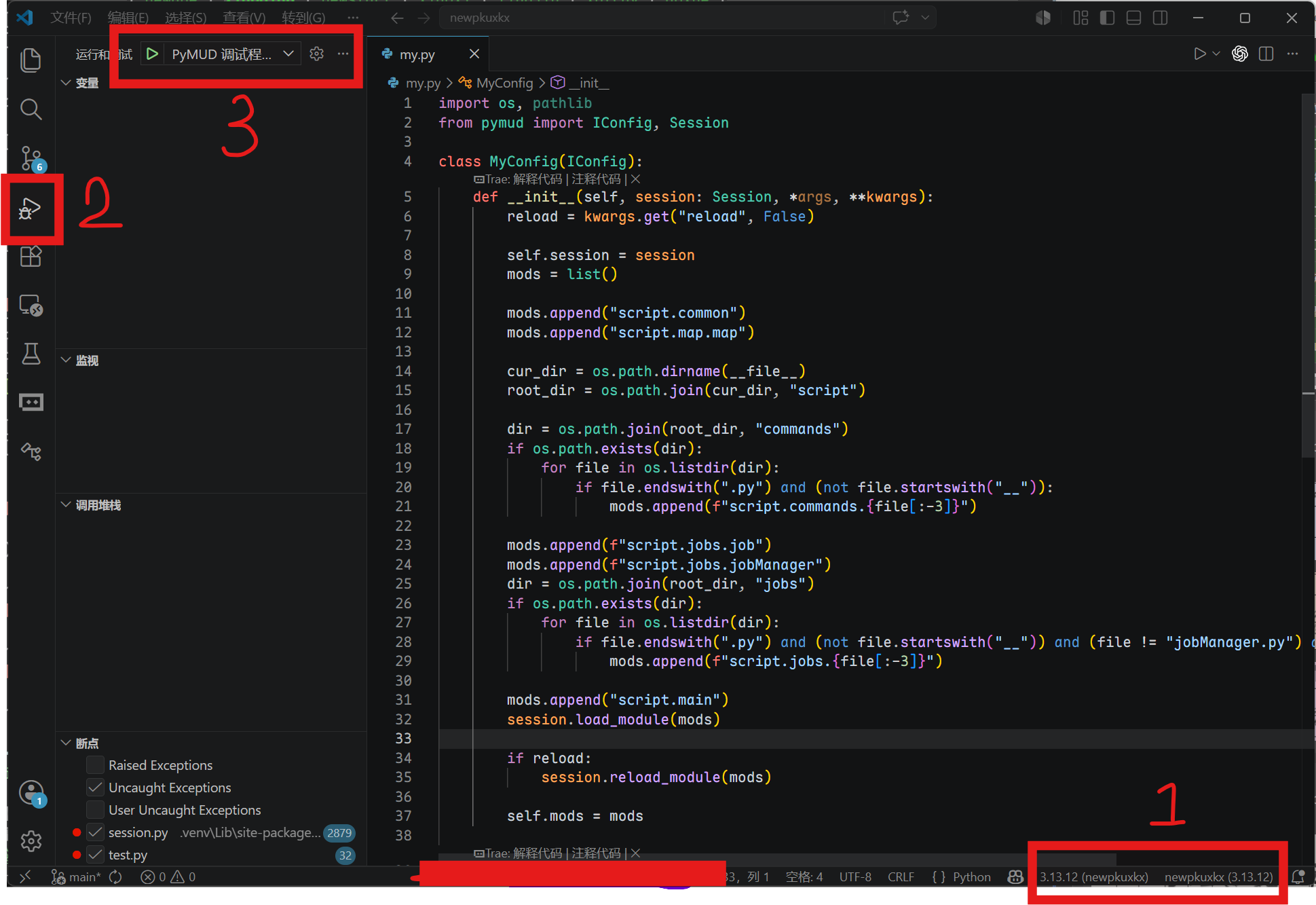
单击上图3处的下拉框。
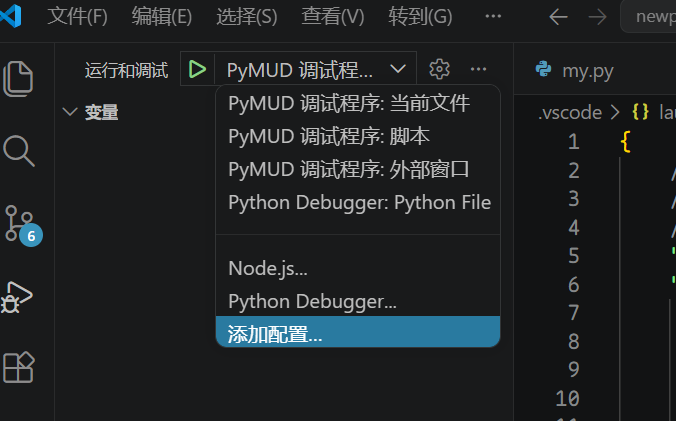
从这里选择添加配置,自动切换到json编辑配置环境,将新增的配置内容修改为如下即可:
        {
            "name": "PyMUD 调试程序: 脚本",
            "type": "debugpy",
            "request": "launch",
            "module": "pymud",
            "justMyCode": false,
            "console": "integratedTerminal",
        },
关键点1:要将原来调试配置中的 “program: ${file}” 这一行删掉,修改为: "module": "pymud"
关键点2: 将 "justMyCode" 设置为 false,可以在pymud包中的代码出打断点和监控
关键点3: console默认为 integratedTerminal,是vscode自己集成的终端中运行,这个也可以修改为externalTerminal,即使用外部终端
上述设置好之后,给这个调试配置去一个名字,比如我上面就叫 "PyMUD 调试程序: 脚本"。
然后,重新从图1中3处下拉框选择该调试配置,即可对脚本(以及pymud模块)进行正常调试了。
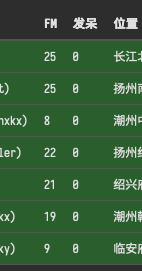
要像上图一样同时监控多个账号的状态,参考以下方法:
from pymud import IConfig

class AExampleOfOverview(IConfig):
    def __init__(self, session, *args, **kwargs):
        ws = self.session.getGlobal("ws")
        if ws and hasattr(ws, "sendOverview"):
            ws.sendOverview(self.session, self.overview)

    # 此函数为关键,返回一个dict,key会作为websocket显示状态的表头,内容在下面
    def overview(self):
        data = dict()
        data["角色"] = (
            f"{self.session.getVariable('name', 'none')}({self.session.getVariable('id', 'id')})"
        )

        # fullme time
        fullme = int(self.session.getVariable("%fullme", 0))
        delta = time.time() - fullme
        data["FM"] = int(delta // 60)
        data["发呆"] = int(self.session.idletime // 60)

        data["位置"] = (
            f"{self.session.getVariable('city', '未知地域')}{self.session.getVariable('room', '未知房间')}"
        )

        data["任务"] = self.session.cmds["jobmanager"].currentJob
        data["状态"] = self.session.cmds["jobmanager"].currentStatus
        data["忙闲"] = "忙" if self.session.getVariable("is_busy", False) else "闲"
        data["战斗"] = self.session.getVariable("is_fighting", False)

        return data
以下是插件最新版本
def get_search_place(self, city, room):
        station = ["大车行", "车马商行", "马车行", "车马行", "大车店", "车行", "马车店"]
        if city == "扬州":
            if room == "鹿鼎公长大的地方":
                room = "丽春院"
            elif room == "衙门里面北院":
                room = "内宅"

        elif city == "衢州":
            if room == "小酒铺":
                room = "酒铺"
            elif room == "大米店":
                room = "米铺"
            elif room == "大南门":
                room = "礼贤门"
            elif room == "大西门":
                room = "航运门"
            elif room == "铁衢门":
                room = "迎和门"
            elif room == "府衙正厅":
                room = "大堂"
            elif room == "余五婆的家":
                room = "民居"
            elif room == "北门":
                room = "永清门"

        elif city == "潮州":
            if room == "邢捕头常在的地方":
                room = "中央广场"
            elif room == "青楼":
                room = "翠红阁"
            elif room in station:
                room = "潮州车行"

        elif city == "代州":
            if room in station:
                room = "靖边大车店"

        elif city == "中原":
            if room in station:
                room = "中原马车总行"

        elif city == "南阳":
            if room in station:
                room = "南阳车行"

        elif city == "上饶":
            if room == "镖局":
                room = "龙虎镖局"
            elif room == "塔山":
                room = "武安山"
            elif room in ("试剑处", "葛玄试剑处"):
                room = "试剑石"
            elif room == "广场":
                room = "中央广场"
            elif room == "酒铺":
                room = "酒馆"

        elif city == "绍兴府":
            if room in station:
                room = "绍兴马车行"
            elif room == "府衙":
                room = "绍兴府衙"
            elif room == "双龙洞内":
                room = "洞内"
            elif room in ("铁匠铺子", "打铁铺"):
                room = "铁匠铺"
            elif room == "西施浣纱处":
                room = "浣纱溪边"
            elif room == "金华火腿店":
                room = "火腿店"
            elif room == "游龙帮总坛":
                room = "游龙帮"

        elif city == "武当山":
            if room in station:
                room = "中原马车行"
            elif room == "张三丰闭关处":
                room = "小屋"

        elif city == "临安府":
            if room in station:
                room = "计氏马车分行"
            elif room == "青楼":
                room = "怡红馆"
            elif room == "府级官员办公处":
                room = "临安府大堂"
            elif room in ("韩世忠府大门", "韩世忠府邸门口"):
                room = "韩王府大门"

        elif city == "湖州":
            if room in station:
                room = "车马行"

        elif city == "大同":
            if room in station:
                room = "大同车行"

        elif city == "建康府南城":
            if room == "官府所在":
                room = "建康府"
            elif room == "青楼":
                room = "绛云楼"
            elif room in ("宠物商店", "宠物商铺"):
                room = "建康府南城宠物店"

        elif city == "威海卫":
            if room in station:
                room = "计氏马车分行"

        elif city == "建康府北城":
            if room in station:
                room = "计氏马车分行"

        elif city == "镇江":
            if room in station:
                room = "计氏马车分行"

        elif city == "嘉兴":
            if room in station:
                room = "计氏马车分行"

        elif city == "处州府":
            if room == "官府所在":
                room = "大厅"
            elif room in station:
                room = "马车行"

        elif city == "天台山":
            if room == "官府所在":
                room = "大堂"

        elif city == "台州":
            if room == "官府所在":
                room = "府衙大堂"

        elif city == "建宁府":
            if room in station:
                room = "建宁马车行"
            elif room == "官府所在":
                room = "府衙"

        elif city == "归云庄":
            if room in station:
                room = "计氏马车分行"

        elif city == "苏州":
            if room in station:
                room = "计氏马车分行"

        elif city == "无锡":
            if room in station:
                room = "无锡车马行"

        elif city == "南昌":
            if room in station:
                room = "计氏马车总行"

        return "{}{}".format(city, room)
PYMUD支持使用socks5代理或者本机的特定网络接口进行网络访问,这本来是没问题的,但是对应北侠fullme的时候,原来提供的websocket插件会无法显示图片。使用浏览器打开时,会提示同一个IP为其他IP的角色显示过fullme图片,因此不能正确显示。此时,就需要让websocket插件通过与会话角色对应的代理或者网络设置来进行显示了。修改原 websocket.py 中的 loadAndSenfFullme 的函数代码,改为如下内容,可以使用与会话相同的网络配置来进行图片获取和下载,再使用websocket传送到web端页面上用于显示。只需要修改此处一个函数即可。
修改后的代码片段如下:
async def loadAndSendFullme(sender, text_msg: str, fullme_url: str, times: int = 3, combine: bool = False):
    fmadress = fullme_url.split("robot.php?filename=")[-1]
    url = f"http://fullme.pkuxkx.net/robot.php?filename={fmadress}"
    images = []

    # 使用与会话相同的网络配置进行图片抓取
    conn = None
    pymudapp = app.pymud
    if isinstance(pymudapp, PyMudApp):
        session = pymudapp.sessions.get(sender)

        if isinstance(session, Session):
            if session.proxy:
                conn = ProxyConnector.from_url(session.proxy)
            elif session.local_address:
                conn = TCPConnector(local_addr=(session.local_address, 0))

    async with ClientSession(connector=conn) as client:
        for i in range(0, times):
            async with client.get(url) as response:
                if response.status != 200:
                    continue

                text = await response.text()
                matches = re.search(r'src="\.([^"]+\.jpg)"', text)
                if not matches:
                    continue

                img_url = "http://fullme.pkuxkx.net" + matches.group(1)

                # 解析URL获取文件名
                parsed_url = urlparse(img_url)
                filename = os.path.basename(unquote(parsed_url.path))
                # 创建fullme目录
                fullme_dir = os.path.join(os.path.dirname(__file__), 'fullme')#cl
                os.makedirs(fullme_dir, exist_ok=True)
                # 本地文件路径
                local_img_path = os.path.join(fullme_dir, filename)
                # 下载图片
                #async with ClientSession(connector=conn) as session:
                async with client.get(img_url) as img_response:
                    if img_response.status == 200:
                        with open(local_img_path, 'wb') as f:
                            f.write(await img_response.read())
                        # 使用本地路径调用
                        if not combine:
                            await send_message_to_clients(sender, text_msg, local_img_path)
                        else:
                            images.append(local_img_path)
                    else:
                        asyncio.create_task(send_message_to_clients(sender, f"{text_msg} (图片下载失败: HTTP {img_response.status})", ""))

            await asyncio.sleep(0.5)

    if combine:
        await send_message_to_clients(sender, text_msg, images)
以下是我使用本地IP连接了5个账号,同时使用代理后,利用远端云服务器连接了2个账号时,websocket插件的显示部分。
English update history is translated by TRAE (GLM5)
invalidate method to Session class. When called, it only triggers PyMudApp.invalidate() for refresh if the current session is the active session.session.application.invalidate() calls in personal scripts, it is recommended to change to session.invalidate(). Because session refresh checks for foreground status, while application refresh forces a refresh.PyMudApp.invalidate() calls will not trigger display refresh. The system only refreshes when switching sessions or on a 1-second timer. This mode can be toggled with the F4 hotkey. In lazy mode, "LAZY" is displayed on the right side of the bottom status bar. This mode can be used to reduce CPU usage when running in the background.noparser in pymud.cfg. This prefix is equivalent to temporarily using verbatim mode.cmd_prefix in pymud.cfg. Also adjusted command display style to match the default info style.del to speed up memory release.del, and garbage collection is triggered programmatically (however, testing showed no significant effect on memory usage).首先在pymud.cfg中增加配置字段 network,内容如下(如果复制使用,请删除注释内容):
{
    // 放在根节点内部即可
    "network" : {
        "ipv6": false,              // 是否启用ipv6,可接受 true|false,默认为false。该设置仅会影响 auto 模式模式,即设置 auto 模式是否会自动获取IPv6地址
        "local_addr": "auto",       // 本地绑定的IP地址,可接受 auto|preset,默认auto,即自动获取本地所有网络设备的IP,当配置为 preset 时,会使用ip_list中的IP
        "ip_list": [                // 当local_addr设置为 preset 时,需要配置该字段,用于指定使用哪个IP进行连接。
            "192.168.1.100",
            "192.168.2.100",
        ],
        "proxy": true,              // 是否启用代理,可接受 true|false,默认为false。
        "proxies": {                // Socks5代理列表,可配置多个,即可以使用无密码的代理,也可以使用用户名密码认证的代理。
            "proxy1": "socks5://192.168.6.66:1080",                         // 使用proxy1标识该无密码代理
            "proxy2": "socks5://user:password@yoursock5proxy.site:1080",    // 使用proxy2标识该用户名密码认证代理
        }
    }
}
当配置完成后,启动pymud时, 世界菜单中,每一个角色的都会添加一个下级菜单,将IP和代理列表中的代理都添加为子菜单。此时,角色自身菜单,以及下级子菜单都可以单机连接到服务器。
当依然单机角色菜单时,会使用系统当前默认网络设备进行连接。
当点击角色下级菜单中的IP时,会指定绑定该IP进行连接。例如,一台设备有2个网卡,一个连接到电信网络,一个连接到联通网络,即使系统设置默认连接是网卡1电信网络,通过IP绑定也可以使用联通网络连接到服务器。
当点击角色下级菜单中的代理时,会指定使用该代理进行连接。例如,在配置中增加了一个代理 proxy1,当点击角色下级菜单中的 proxy1 时,会使用该代理进行连接。
也可以在#session/#connect命令中指定IP或代理。二者语法相同,都是在最后面增加了 >> 来指定IP或代理。注意,>>之后的IP或者代理之间没有空格。例如:
#con命令也可以使用三个大于号 >>> 来连接。这二者区别在于,当使用 >> 时,该配置会变成本会话的默认配置,下次直接 #con 就是使用该配置;而使用 >>> 时,只是临时指定该配置,下次 #con 还是会使用原先的配置。
图片有点模糊,看不清楚
ssh (Secure Shell) 是一个用于安全远程登录和执行命令的工具。以下参数基于 OpenSSH 客户端。
ssh [-46AaCfGgKkMNnqsTtVvXxYy] [-B bind_interface] [-b bind_address]
    [-c cipher_spec] [-D [bind_address:]port] [-E log_file]
    [-e escape_char] [-F configfile] [-I pkcs11] [-i identity_file]
    [-J destination] [-L address] [-l login_name] [-m mac_spec]
    [-O ctl_cmd] [-o option] [-P tag] [-p port] [-R address]
    [-S ctl_path] [-W host:port] [-w local_tun[:remote_tun]]
    destination [command [argument ...]]
ssh [-Q query_option]
| 参数 | 说明 |
|---|---|
| -4 | 强制使用 IPv4 地址。 |
| -6 | 强制使用 IPv6 地址。 |
| -A | 启用认证代理转发。允许远程主机通过本地 SSH 代理进行认证。 |
| -a | 禁止认证代理转发。 |
| -C | 启用压缩。所有数据在传输前都会被压缩。 |
| -f | 后台运行。SSH 会在执行命令前转入后台,通常与 -n 配合使用。 |
| -g | 允许远程主机连接本地转发的端口。如果不使用此选项,端口转发仅绑定到本地回环地址。 |
| -i identity_file | 指定用于公钥认证的私钥文件路径(例如 ~/.ssh/id_rsa)。 |
| -l login_name | 指定登录远程主机的用户名。 |
| -N | 不执行远程命令。仅用于端口转发。 |
| -n | 将标准输入重定向到 /dev/null。通常用于后台运行 SSH。 |
| -p port | 指定远程 SSH 服务监听的端口号(默认为 22)。 |
| -q | 静默模式。抑制所有警告和诊断信息。 |
| -t | 强制分配伪终端。对于运行全屏程序(如 top 或文本菜单)非常有用。 |
| -v | 详细模式。打印调试信息。可使用多个 -v(如 -vvv)以增加详细程度。 |
| -X | 启用可信的 X11 转发。 |
| -x | 禁用 X11 转发。 |
| -Y | 启用可信的 X11 转发(比 -X 更宽松的信任级别)。 |
| -y | 启用信任的 X11 转发(与 -Y 类似,具体行为可能依赖于实现)。 |
| -B bind_interface | 指定 SSH 客户端发送数据包的网络接口。 |
| -b bind_address | 在本地主机上绑定指定的源地址(源 IP)发出连接。 |
| -c cipher_spec | 指定用于加密会话的加密算法。 |
| -D [bind_address:]port | 指定本地动态应用程序级端口转发。SSH 将充当 SOCKS 代理服务器。 |
| -E log_file | 将调试日志追加到指定的文件中。 |
| -e escape_char | 设置转义字符(默认为 ~)。 |
| -F configfile | 指定一个替代的配置文件(默认为 ~/.ssh/config)。 |
| -I pkcs11 | 指定 PKCS#11 共享库的路径,用于硬件安全密钥。 |
| -J destination | 指定跳转主机(Jump Host)。格式为 [user@]host[:port],可指定多个。 |
| -L address | 指定本地端口转发。将本地端口映射到远程主机的某个端口。 |
| -m mac_spec | 指定用于数据完整性校验的消息认证码(MAC)算法。 |
| -O ctl_cmd | 控制一个正在运行的 SSH 多路复用主进程(如 check, exit, stop)。 |
| -o option | 以 选项=值 的形式指定配置选项(如 -o StrictHostKeyChecking=no)。 |
| -P tag | 与 -Q 一起使用,用于查询特定的配置参数。 |
| -R address | 指定远程端口转发。将远程主机的端口映射到本地主机的某个端口。 |
| -S ctl_path | 指定用于连接共享的控制套接字路径。 |
| -W host:port | 将本地标准输入输出直接连接到远程主机的指定端口。 |
| -w local_tun[:remote_tun] | 请求 TUN/TAP 接口转发,用于创建虚拟专用网络(VPN)。 |
| -Q query_option | 查询可用的加密算法、MAC 等信息(如 ssh -Q cipher)。 |
ssh user@hostnamessh -p 2222 user@hostnamessh -L 8080:localhost:80 user@hostname (将本地 8080 转发到远程的 80)ssh -D 1080 user@hostnamessh -f -N -L 8080:localhost:80 user@hostnameusage: ssh [-46AaCfGgKkMNnqsTtVvXxYy] [-B bind_interface] [-b bind_address]
[-c cipher_spec] [-D [bind_address:]port] [-E log_file]
[-e escape_char] [-F configfile] [-I pkcs11] [-i identity_file]
[-J destination] [-L address] [-l login_name] [-m mac_spec]
[-O ctl_cmd] [-o option] [-P tag] [-p port] [-Q query_option]
[-R address] [-S ctl_path] [-W host:port] [-w local_tun[:remote_tun]]
destination [command [argument ...]]
ssh 命令是 Linux/Unix 系统中用于安全远程登录的核心工具,其参数众多,功能强大。
为了更清晰地理解,我将这些参数按照功能逻辑分为了 连接与身份、端口转发、认证与密钥、会话与调试 以及 版本与配置 五大类进行详细解释。
这些参数用于指定你要连接到哪里,以及以谁的身份登录。
| 参数 | 全称/含义 | 详细解释 |
|---|---|---|
| destination | 目标主机 | 核心参数,指定要连接的远程主机。格式通常为 [user@]hostname。 |
| [command] | 执行命令 | 如果指定,将在远程主机上执行该命令后退出,而不是启动交互式 shell。 |
-p port |
端口 | 指定远程 SSH 服务监听的端口号(默认是 22)。 |
-l login_name |
登录名 | 指定登录远程主机的用户名(例如 ssh -l root host)。 |
-4 |
仅 IPv4 | 强制 SSH 仅使用 IPv4 地址进行连接。 |
-6 |
仅 IPv6 | 强制 SSH 仅使用 IPv6 地址进行连接。 |
-J destination |
跳板/代理跳转 | 通过一个或多个跳板机(Jump Host)连接到最终目标(例如 ssh -J user@gateway user@final)。 |
SSH 不仅仅是登录,还可以作为安全隧道传输其他数据。
| 参数 | 全称/含义 | 详细解释 |
|---|---|---|
-L |
本地端口转发 | 将本地的某个端口流量通过 SSH 隧道转发到远程主机的某个地址和端口(例如 -L 8080:localhost:80,本地访问 8080 即访问远程的 80 端口)。 |
-R |
远程端口转发 | 将远程主机的某个端口流量通过 SSH 隧道转发回本地(例如 -R 9000:localhost:80,远程访问 9000 即访问本地的 80 端口)。 |
-D |
动态端口转发 | 开启 SOCKS 代理服务器。指定本地一个端口,所有发往该端口的流量都会通过 SSH 隧道动态转发。 |
-g |
网关端口 | 允许远程主机连接到本地转发的端口(默认情况下,端口转发仅绑定到 localhost,使用此参数可让其他机器连接)。 |
-w |
TUN/TAP 隧道 | 用于转发网络层(Layer 3)或链路层(Layer 2)的数据包,常用于构建 VPN。 |
这些参数控制如何证明你的身份。
| 参数 | 全称/含义 | 详细解释 |
|---|---|---|
-i identity_file |
身份文件 | 指定用于公钥认证的私钥文件(默认是 ~/.ssh/id_rsa 等)。 |
-A |
启用代理转发 | 允许将本地的 SSH 代理(ssh-agent)连接转发到远程主机。注意: 这有安全风险,因为远程用户可能利用你的本地密钥进行跳板攻击。 |
-a |
禁用代理转发 | 禁止转发认证代理的连接(默认行为)。 |
-K |
GSSAPI 委托 | 启用基于 GSSAPI(如 Kerberos)的身份验证和凭据转发。 |
-k |
禁用 GSSAPI | 禁用向服务器转发 GSSAPI 凭据。 |
-I pkcs11 |
智能卡/PKCS#11 | 指定用于与智能卡通信的 PKCS#11 共享库,用于硬件密钥认证。 |
控制终端行为、连接管理和故障排查。
| 参数 | 全称/含义 | 详细解释 |
|---|---|---|
-t |
强制伪终端 | 强制分配一个伪终端(PTY)。当你需要在远程运行基于屏幕的程序(如 top、vim 或菜单脚本)时非常有用。 |
-T |
禁止分配终端 | 禁止分配伪终端。适用于执行自动化脚本或传输文件时,防止远程系统分配不必要的资源。 |
-f |
后台运行 | 请求 SSH 在执行命令前转入后台运行(通常与 -n 配合使用)。 |
-n |
重定向 stdin | 将标准输入重定向到 /dev/null。通常用于后台运行,防止 SSH 从标准输入读取数据。 |
-N |
不执行命令 | 不在远程执行任何命令。通常仅用于端口转发(-L/-R)时,只建立隧道而不打开 shell。 |
-v |
冗详模式 | 显示详细的调试信息。-v 显示一级信息,-vvv 显示最详细信息,用于排查连接失败原因。 |
-q |
安静模式 | 抑制大部分警告和诊断信息,让输出更干净。 |
-e escape_char |
转义字符 | 设置用于退出 SSH 会话的控制字符(默认是 ~)。例如 -e none 会使会话完全透明,禁用转义功能。 |
-C |
压缩数据 | 启用压缩(类似 gzip),在慢速网络下可以加速传输,但会增加 CPU 负担。 |
-S ctl_path |
控制套接字 | 指定用于连接共享(Connection Multiplexing)的控制套接字路径,允许复用同一个 TCP 连接以加快后续连接速度。 |
指定配置文件和加密算法。
| 参数 | 全称/含义 | 详细解释 |
|---|---|---|
-F configfile |
配置文件 | 指定一个替代的用户级配置文件(默认是 ~/.ssh/config),而不是使用系统默认配置。 |
-o option |
配置选项 | 以 Key=Value 的形式传递配置指令(例如 ssh -o "StrictHostKeyChecking=no" host),用于设置没有单独命令行开关的选项。 |
-c cipher_spec |
加密算法 | 指定会话加密的密码算法(如 aes256-ctr)。OpenSSH 会自动协商,通常无需手动指定。 |
-m mac_spec |
MAC 算法 | 指定消息认证码(Message Authentication Code)算法,用于确保数据完整性。 |
-B bind_interface |
绑定接口 | 在多网卡机器上,指定从哪个本地网络接口发出连接。 |
-b bind_address |
绑定地址 | 在多 IP 地址的机器上,指定连接的源 IP 地址。 |
-E log_file |
日志文件 | 将调试日志追加到指定文件中,而不是输出到标准错误 stderr。 |
 补充说明
补充说明-v(小写)是详细模式,而 -V(大写)是显示版本信息并退出。~/.ssh/config),最后是系统配置文件 (/etc/ssh/ssh_config)。-A(代理转发)时要非常小心,因为它可能让远程服务器上的恶意用户利用你的本地私钥访问其他服务器。pymud.cfg里,client字典下有一个叫『auto_reconnect』的配置,设置为true就可以自动重连,该配置默认为false。另外,还有一个『reconnect_wait』配置,控制断线自动重连前的等待时间,默认为15(秒)。
上述内容在帮助文档里有,详见:https://www.pymud.cn/doc/settings.html#client
0.22.3版已增加
(Translation by Quark)