
0.22.8 (2026-08-09)
- 问题修复: 修复如果变量的值带ANSI颜色代码,会无法打印的问题。
- 问题修复:修复如果变量的键是数字类型,会无法正常打印的问题。
- 感谢 @hhyzz 提供的问题BUG和修复代码

Forum wide moderators
已按你提供的见习修复上述问题,并发布0.22.8版。
给一个参考(片段),炼药的,判断颜色后执行对应操作:
触发器使用raw模式,抓取对应的ANSI颜色代码,根据不同颜色执行不同处理:
Trigger(self.session, "^\x1b\\[([\\d;]+)m[\r\n]*$", raw = True, enabled = False, id = "tri_medicine_color", onSuccess = self.ontri_color, group = "medicine")

def ontri_color(self, name, line, wildcards):
        color = wildcards[0]
        if "31" in color:           # 31: red
            self.info(f"颜色:红色 ({color}), 使用 turnup")
            self.session.writeline("turnup")

        elif "35" in color:         # 35: magenta
            self.info(f"颜色:紫色 ({color}), 使用 blow")
            self.session.writeline("blow")

        elif "37" in color:         # 37: while
            self.info(f"颜色:白色 ({color}), 使用 turndown")
            self.session.writeline("turndown")

        elif "36" in color:         # 36: cyan
            self.info(f"颜色:青色 ({color}), 使用 defend")
            self.session.writeline("defend")

        else:
            self.warning(f"未知的颜色代码: {color}")

        self._objs["color"].enabled = False
tmux.conf配置设置缓存上限?
对PyMUD的脚本调试设置其实很简单,以下是以vscode为例的设置步骤。
按下图,先将1处,python脚本环境设置为你的venv所在的环境,uv的、venv直接创建的、或者原始的环境都可以,目的是让调试环境找得到python运行程序以及pymud包文件。然后单击2处,切换到调试界面,从3处点击下拉框,见第二张图。
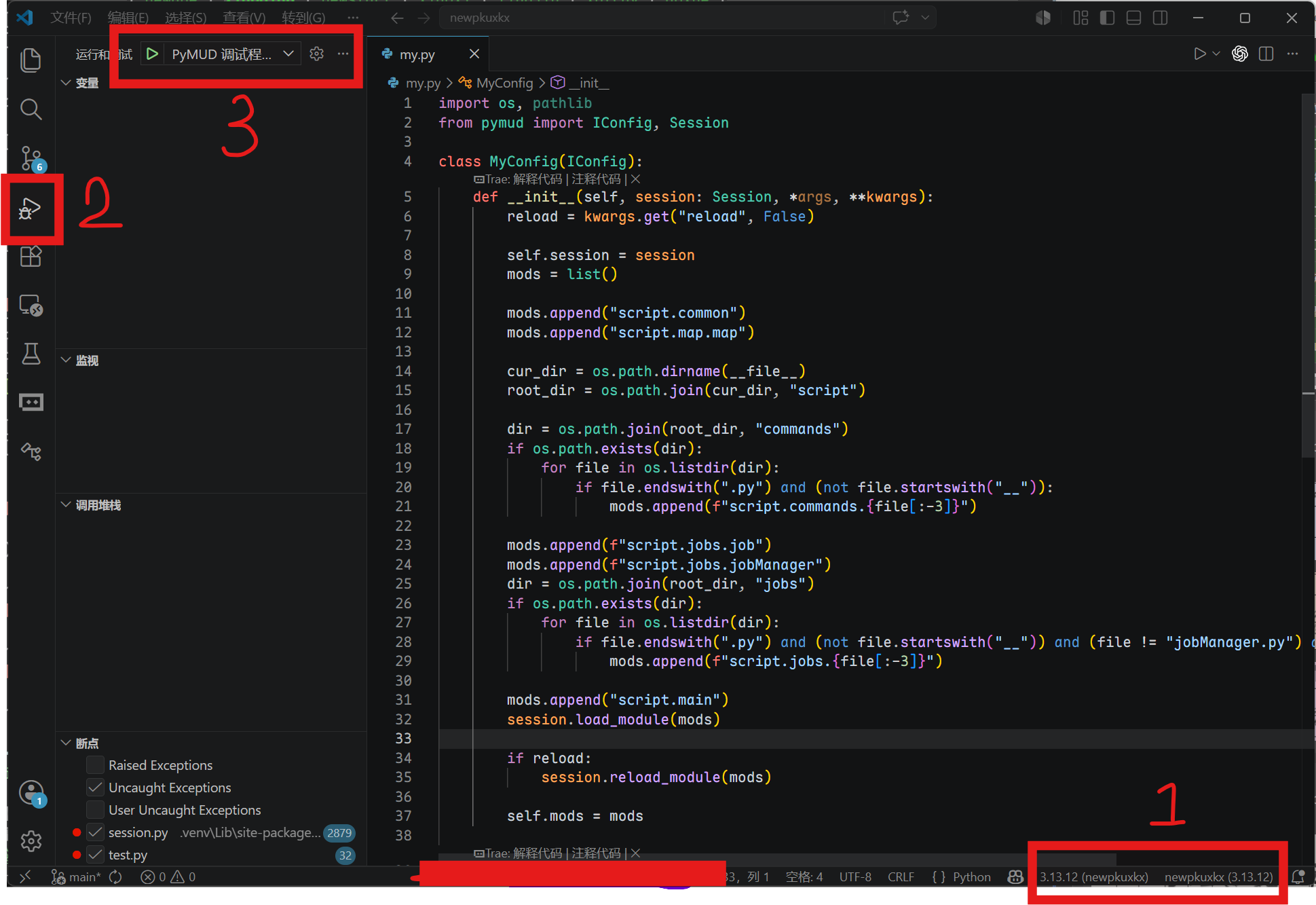
单击上图3处的下拉框。
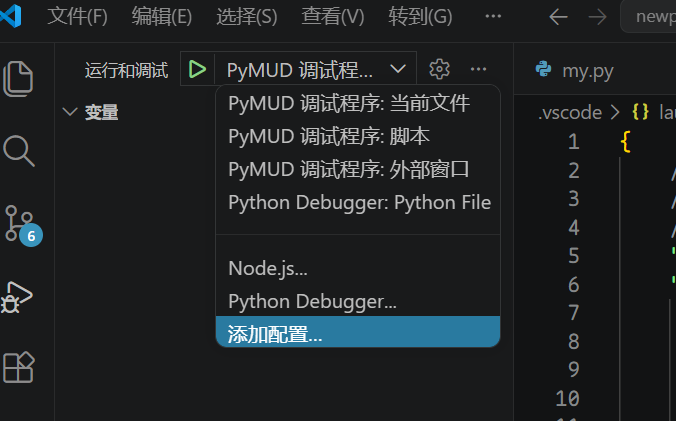
从这里选择添加配置,自动切换到json编辑配置环境,将新增的配置内容修改为如下即可:
        {
            "name": "PyMUD 调试程序: 脚本",
            "type": "debugpy",
            "request": "launch",
            "module": "pymud",
            "justMyCode": false,
            "console": "integratedTerminal",
        },
关键点1:要将原来调试配置中的 “program: ${file}” 这一行删掉,修改为: "module": "pymud"
关键点2: 将 "justMyCode" 设置为 false,可以在pymud包中的代码出打断点和监控
关键点3: console默认为 integratedTerminal,是vscode自己集成的终端中运行,这个也可以修改为externalTerminal,即使用外部终端
上述设置好之后,给这个调试配置去一个名字,比如我上面就叫 "PyMUD 调试程序: 脚本"。
然后,重新从图1中3处下拉框选择该调试配置,即可对脚本(以及pymud模块)进行正常调试了。
要像上图一样同时监控多个账号的状态,参考以下方法:
from pymud import IConfig

class AExampleOfOverview(IConfig):
    def __init__(self, session, *args, **kwargs):
        ws = self.session.getGlobal("ws")
        if ws and hasattr(ws, "sendOverview"):
            ws.sendOverview(self.session, self.overview)

    # 此函数为关键,返回一个dict,key会作为websocket显示状态的表头,内容在下面
    def overview(self):
        data = dict()
        data["角色"] = (
            f"{self.session.getVariable('name', 'none')}({self.session.getVariable('id', 'id')})"
        )

        # fullme time
        fullme = int(self.session.getVariable("%fullme", 0))
        delta = time.time() - fullme
        data["FM"] = int(delta // 60)
        data["发呆"] = int(self.session.idletime // 60)

        data["位置"] = (
            f"{self.session.getVariable('city', '未知地域')}{self.session.getVariable('room', '未知房间')}"
        )

        data["任务"] = self.session.cmds["jobmanager"].currentJob
        data["状态"] = self.session.cmds["jobmanager"].currentStatus
        data["忙闲"] = "忙" if self.session.getVariable("is_busy", False) else "闲"
        data["战斗"] = self.session.getVariable("is_fighting", False)

        return data
以下是插件最新版本
def get_search_place(self, city, room):
        station = ["大车行", "车马商行", "马车行", "车马行", "大车店", "车行", "马车店"]
        if city == "扬州":
            if room == "鹿鼎公长大的地方":
                room = "丽春院"
            elif room == "衙门里面北院":
                room = "内宅"

        elif city == "衢州":
            if room == "小酒铺":
                room = "酒铺"
            elif room == "大米店":
                room = "米铺"
            elif room == "大南门":
                room = "礼贤门"
            elif room == "大西门":
                room = "航运门"
            elif room == "铁衢门":
                room = "迎和门"
            elif room == "府衙正厅":
                room = "大堂"
            elif room == "余五婆的家":
                room = "民居"
            elif room == "北门":
                room = "永清门"

        elif city == "潮州":
            if room == "邢捕头常在的地方":
                room = "中央广场"
            elif room == "青楼":
                room = "翠红阁"
            elif room in station:
                room = "潮州车行"

        elif city == "代州":
            if room in station:
                room = "靖边大车店"

        elif city == "中原":
            if room in station:
                room = "中原马车总行"

        elif city == "南阳":
            if room in station:
                room = "南阳车行"

        elif city == "上饶":
            if room == "镖局":
                room = "龙虎镖局"
            elif room == "塔山":
                room = "武安山"
            elif room in ("试剑处", "葛玄试剑处"):
                room = "试剑石"
            elif room == "广场":
                room = "中央广场"
            elif room == "酒铺":
                room = "酒馆"

        elif city == "绍兴府":
            if room in station:
                room = "绍兴马车行"
            elif room == "府衙":
                room = "绍兴府衙"
            elif room == "双龙洞内":
                room = "洞内"
            elif room in ("铁匠铺子", "打铁铺"):
                room = "铁匠铺"
            elif room == "西施浣纱处":
                room = "浣纱溪边"
            elif room == "金华火腿店":
                room = "火腿店"
            elif room == "游龙帮总坛":
                room = "游龙帮"

        elif city == "武当山":
            if room in station:
                room = "中原马车行"
            elif room == "张三丰闭关处":
                room = "小屋"

        elif city == "临安府":
            if room in station:
                room = "计氏马车分行"
            elif room == "青楼":
                room = "怡红馆"
            elif room == "府级官员办公处":
                room = "临安府大堂"
            elif room in ("韩世忠府大门", "韩世忠府邸门口"):
                room = "韩王府大门"

        elif city == "湖州":
            if room in station:
                room = "车马行"

        elif city == "大同":
            if room in station:
                room = "大同车行"

        elif city == "建康府南城":
            if room == "官府所在":
                room = "建康府"
            elif room == "青楼":
                room = "绛云楼"
            elif room in ("宠物商店", "宠物商铺"):
                room = "建康府南城宠物店"

        elif city == "威海卫":
            if room in station:
                room = "计氏马车分行"

        elif city == "建康府北城":
            if room in station:
                room = "计氏马车分行"

        elif city == "镇江":
            if room in station:
                room = "计氏马车分行"

        elif city == "嘉兴":
            if room in station:
                room = "计氏马车分行"

        elif city == "处州府":
            if room == "官府所在":
                room = "大厅"
            elif room in station:
                room = "马车行"

        elif city == "天台山":
            if room == "官府所在":
                room = "大堂"

        elif city == "台州":
            if room == "官府所在":
                room = "府衙大堂"

        elif city == "建宁府":
            if room in station:
                room = "建宁马车行"
            elif room == "官府所在":
                room = "府衙"

        elif city == "归云庄":
            if room in station:
                room = "计氏马车分行"

        elif city == "苏州":
            if room in station:
                room = "计氏马车分行"

        elif city == "无锡":
            if room in station:
                room = "无锡车马行"

        elif city == "南昌":
            if room in station:
                room = "计氏马车总行"

        return "{}{}".format(city, room)
PYMUD支持使用socks5代理或者本机的特定网络接口进行网络访问,这本来是没问题的,但是对应北侠fullme的时候,原来提供的websocket插件会无法显示图片。使用浏览器打开时,会提示同一个IP为其他IP的角色显示过fullme图片,因此不能正确显示。此时,就需要让websocket插件通过与会话角色对应的代理或者网络设置来进行显示了。修改原 websocket.py 中的 loadAndSenfFullme 的函数代码,改为如下内容,可以使用与会话相同的网络配置来进行图片获取和下载,再使用websocket传送到web端页面上用于显示。只需要修改此处一个函数即可。
修改后的代码片段如下:
async def loadAndSendFullme(sender, text_msg: str, fullme_url: str, times: int = 3, combine: bool = False):
    fmadress = fullme_url.split("robot.php?filename=")[-1]
    url = f"http://fullme.pkuxkx.net/robot.php?filename={fmadress}"
    images = []

    # 使用与会话相同的网络配置进行图片抓取
    conn = None
    pymudapp = app.pymud
    if isinstance(pymudapp, PyMudApp):
        session = pymudapp.sessions.get(sender)

        if isinstance(session, Session):
            if session.proxy:
                conn = ProxyConnector.from_url(session.proxy)
            elif session.local_address:
                conn = TCPConnector(local_addr=(session.local_address, 0))

    async with ClientSession(connector=conn) as client:
        for i in range(0, times):
            async with client.get(url) as response:
                if response.status != 200:
                    continue

                text = await response.text()
                matches = re.search(r'src="\.([^"]+\.jpg)"', text)
                if not matches:
                    continue

                img_url = "http://fullme.pkuxkx.net" + matches.group(1)

                # 解析URL获取文件名
                parsed_url = urlparse(img_url)
                filename = os.path.basename(unquote(parsed_url.path))
                # 创建fullme目录
                fullme_dir = os.path.join(os.path.dirname(__file__), 'fullme')#cl
                os.makedirs(fullme_dir, exist_ok=True)
                # 本地文件路径
                local_img_path = os.path.join(fullme_dir, filename)
                # 下载图片
                #async with ClientSession(connector=conn) as session:
                async with client.get(img_url) as img_response:
                    if img_response.status == 200:
                        with open(local_img_path, 'wb') as f:
                            f.write(await img_response.read())
                        # 使用本地路径调用
                        if not combine:
                            await send_message_to_clients(sender, text_msg, local_img_path)
                        else:
                            images.append(local_img_path)
                    else:
                        asyncio.create_task(send_message_to_clients(sender, f"{text_msg} (图片下载失败: HTTP {img_response.status})", ""))

            await asyncio.sleep(0.5)

    if combine:
        await send_message_to_clients(sender, text_msg, images)
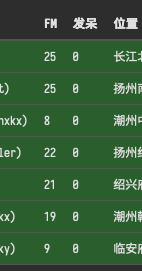
以下是我使用本地IP连接了5个账号,同时使用代理后,利用远端云服务器连接了2个账号时,websocket插件的显示部分。
English update history is translated by TRAE (GLM5)
invalidate method to Session class. When called, it only triggers PyMudApp.invalidate() for refresh if the current session is the active session.session.application.invalidate() calls in personal scripts, it is recommended to change to session.invalidate(). Because session refresh checks for foreground status, while application refresh forces a refresh.PyMudApp.invalidate() calls will not trigger display refresh. The system only refreshes when switching sessions or on a 1-second timer. This mode can be toggled with the F4 hotkey. In lazy mode, "LAZY" is displayed on the right side of the bottom status bar. This mode can be used to reduce CPU usage when running in the background.noparser in pymud.cfg. This prefix is equivalent to temporarily using verbatim mode.cmd_prefix in pymud.cfg. Also adjusted command display style to match the default info style.del to speed up memory release.del, and garbage collection is triggered programmatically (however, testing showed no significant effect on memory usage).